
Deposits & Withdrawals
The cheapest P2P price you probably cannot use
The list sorts by price, but the top entry is a pinned slot outside the sort. What matters more is the limit column: sampling the hryvnia market, a 5,000 UAH order could only be filled by the most expensive of the first five merchants.
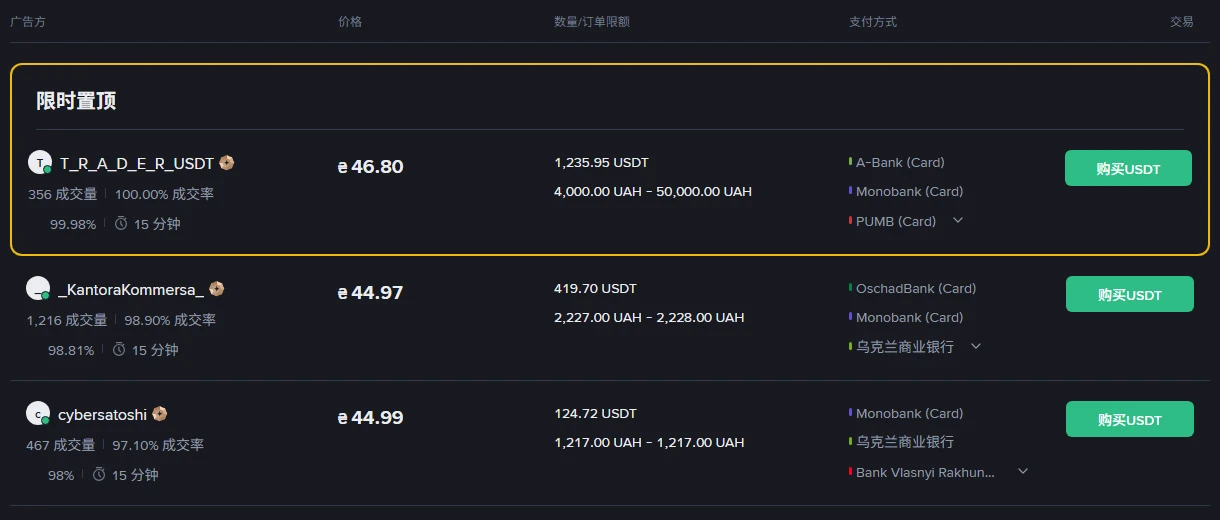
Open Binance P2P and the list is sorted by price. You want USDT, so you scan down for the cheapest one. Reasonable instinct — and it is where most beginners either get stuck or overpay.
The problem is not in the price column. It is the one next to it: Amount / Order Limit.
A real list, one moment in time
The UAH buy side, 9 September 2026, visible without logging in:
Prices down the page: ₴46.80, ₴44.97, ₴44.99, ₴45.00, ₴45.23. The one at the top is the most expensive of them.
It sits outside the sort. Binance boxes it separately and labels it a time-limited pin — a display slot independent of price ordering. The queue by price starts below it.
But "skip the first one" is the wrong lesson
Read the limits column:
| Merchant | Price ₴ | Limit UAH |
|---|---|---|
| T_R_A_D_E_R | 46.80 | 4,000–50,000 |
| KantoraKommersa | 44.97 | 2,227–2,228 |
| cybersatoshi | 44.99 | 1,217–1,217 |
| ExTurk | 45.00 | 1,425–1,425 |
| Glovo24 | 45.23 | 8,000–39,999 |
The first row is the pinned slot; the four below it are the price-sorted queue.
Say you want to buy 5,000 UAH worth. Work down that column: 2,227–2,228 no, 1,217–1,217 no, 1,425–1,425 no, 8,000–39,999 no.
Of these five, the only merchant who can take your order is the most expensive one.
That is the confusion beginners run into. You can see ₴44.97 on screen and be unable to trade at it. The price belongs to whoever fits the limit.
Notice how tight some of those windows are. ₴44.97 is offered on a range of exactly one hryvnia — 2,227.00 to 2,228.00. ₴44.99 has no range at all: 1,217 to 1,217. You buy precisely that amount or you do not trade with them.
So fill in the amount first
There is an "Amount" box at the top left, with the fiat selector beside it. Enter what you actually want to spend before anything else. The list then shows only adverts that can take it, and the prices you are comparing become prices you can have.
Do it in the other order and you are ranking quotes that have nothing to do with you.
What the other columns mean
Trades and completion rate. The two figures under the merchant's name — "1,216 trades | 98.90% completion". Trades is the lifetime count; completion is the share that actually finished. A low count is not automatically a problem, but there is no reason to make a new merchant your first ever P2P order.
The release window. The clock icon and "15 min" is the ceiling for the merchant to release coins after you pay, and equally your window to pay. A 30-minute merchant is not slower — the window is just wider.
Payment methods. What that merchant accepts. In the screenshot: A-Bank, Monobank, PUMB, OschadBank cards. It has to be an account in your own name. Paying from someone else's account is the single most common way to land in a P2P dispute.
Note that the same names repeat across merchants — Monobank appears on nearly every row. That is what liquidity in a local market looks like, and it is why "which bank do I have" narrows the list faster than price does.
P2P requires completed identity verification. Without a Binance account yet, this site's sign-up page covers what to settle before registering.
About the prices themselves
Everything above is a snapshot. P2P quotes move continuously, and they differ sharply between fiat markets. Do not memorise the numbers in this article and do not check them against your screen — they are stale by definition.
What is worth keeping is the order of operations: filter by amount, then compare price, then confirm the payment method and the limit window.
If you will move the USDT to another wallet afterwards, read same coin, 33x the fee first. A wrong chain costs far more than any P2P spread.
One more thing. P2P is often described as "zero fee". The fee line genuinely is zero, but the merchant's quote carries a margin. Your real cost is their quote against the market price at that moment — not whether a fee row exists.
The visible fees, trading and withdrawal, are worked through against the official table in reading the fee table.
Write it down after it settles
Date, quantity bought, unit price, fiat total, payment method, merchant name.
Not for neatness. Where that money came from and at what price it entered is something only your own record holds. Exchange history exports, but formats change; when you later need to establish your cost basis or explain the source of funds, those six figures are all you have.
Screenshot from the Binance P2P hryvnia buy side, captured 2026-09-09 without logging in. Quotes, merchants and limits move in real time; the figures here illustrate what the columns mean and are not the market you will see.
Sign-up entries on this site are referral links and this site earns a commission from them. This is an independent content site, not Binance and not its support team, and it cannot intervene in a P2P dispute — that goes through Binance's appeal channel.