
Deposits & Withdrawals
Same coin, 33x the fee: picking a Binance withdrawal network
Withdrawing the same token over a different chain can cost thirty times more. In the official Binance fee table, 1INCH costs 0.24 over BEP20 and 7.94 over ERC20. What to check, in what order, before you hit send.
You want to move 30 USDT to another wallet. The withdrawal page asks you to pick a "network" and offers half a dozen abbreviations you have never seen. You pick one and confirm.
It arrives. Eight dollars short.
Nothing went wrong. You chose that. Moving the same coin over different chains can cost thirty times more or less, and Binance publishes those numbers openly. Nobody tells beginners to go look.
How big the gap actually is
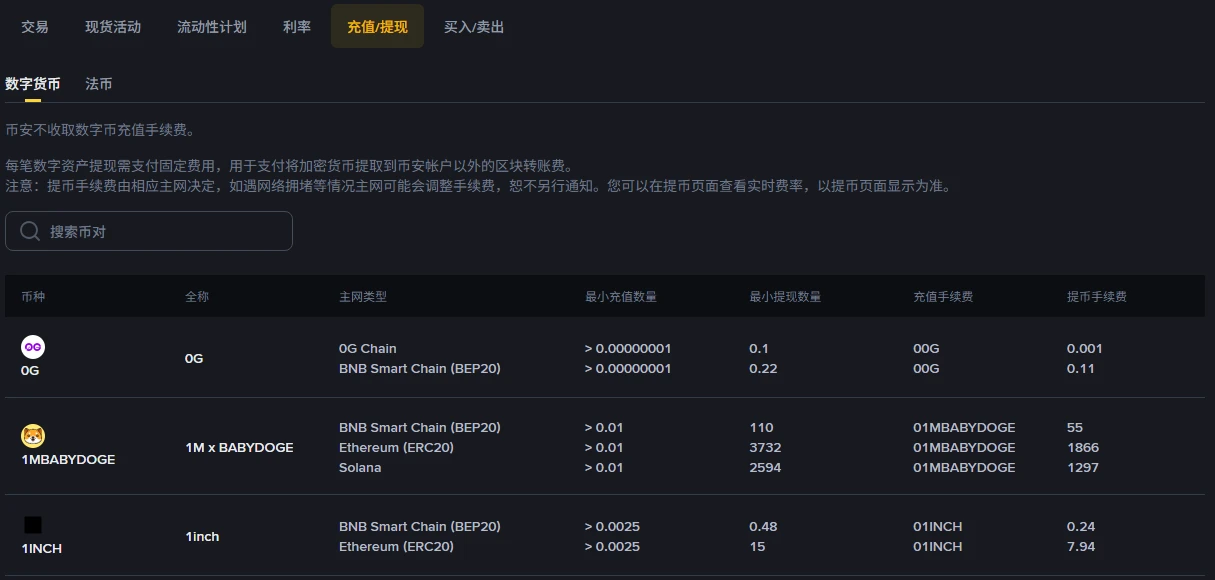
This is the Deposit/Withdraw tab of the Binance fee overview page, captured 7 September 2026:
Look at the 1INCH row:
- Over BNB Smart Chain (BEP20): withdrawal fee 0.24
- Over Ethereum (ERC20): withdrawal fee 7.94
Same coin, same action, 33 times the cost.
Or 1M x BABYDOGE: 55 over BEP20, 1297 over Solana, 1866 over ERC20.
This is not Binance charging differently per chain. The note above the table says it plainly: the fee covers the blockchain transfer cost of moving crypto out of your Binance account, and it is determined by the respective mainnet. The chain is what is expensive. Binance collects that amount and pays it on your behalf.
Three things that follow
One: the fee is a flat amount, not a percentage. Withdrawing 30 USDT and withdrawing 3,000 USDT costs the same on a given chain. Which means small withdrawals are punished brutally — a fee of 7.94 coins spread over a 30-coin withdrawal eats a quarter of it. Either batch your withdrawals or move to a cheaper chain.
On top of the withdrawal fee there is the trading fee itself; how that one works is covered separately.
Two: deposits are free, withdrawals are not. The first line of the table states that Binance does not charge deposit fees for crypto. Money coming in is free; money going out is not. That asymmetry confuses almost everyone on their first transfer.
Three: the receiving side has to support the same chain. This matters more than saving money. Send over BEP20 to an address that only accepts ERC20 and the coins may be gone for good. Ask the destination — the other exchange, or your wallet — which networks it supports first, then come back and choose. Do it in that order.
Checking your own coin
The screenshot above only reaches the first few rows alphabetically. Two places to look for yours:
The public fee page. The page this table comes from has a search box. Type a ticker and you get its minimum withdrawal amount and fee on every supported chain. No login required.
The withdrawal page itself. This one matters more. Binance warns that mainnets may adjust fees during congestion without prior notice, and that the withdrawal page is authoritative. So treat the public table as a tool for comparing before you act, and the withdrawal screen as the number you are actually paying.
A workable order:
- Ask the destination which networks it accepts
- Compare those networks on the public fee page
- Open the withdrawal page, select the network, and read the fee and minimum amount shown there
- Verify the address, then submit
Step 3 is not optional. The table figure and the live figure differing is normal, not a red flag.
Write it down while you are there
After the transfer, note six things: date, coin, network, amount sent, fee, amount received.
Not for tidiness. When you later need to reconcile a rebate, match what the other side actually credited, or explain where a sum came from and went, those six numbers are your entire evidence. Exchange history can be exported, but export formats change, and the chain will not annotate what the transfer was for.
Whether you need these records for tax depends on where you live. Checking whether a crypto tax law is actually in force uses Ukraine as the worked example.
Figures from the Deposit/Withdraw tab of the Binance fee overview page, verified by screenshot on 2026-09-07. Fees move with mainnet conditions; the number on your withdrawal page at the time is the one that counts.
Sign-up entries on this site are referral links and this site earns a commission from them. This is an independent content site, not Binance and not its support team.