
Verification & Security
Is that Binance support message real? Check it yourself
Binance publishes a free tool that checks whether a website, email, phone number or Telegram handle is genuinely theirs. No login required. And one line on that page settles most cases outright.
Someone messages you on Telegram. The avatar is the orange Binance diamond, the handle says "Binance Official Support". Your account has been flagged, they say, and you need to cooperate or your funds will be frozen.
Or it is an email from something that looks like binance, telling you a withdrawal is pending confirmation. Click here.
What every version of this has in common is that you have to believe who they say they are. Binance publishes a free tool that settles that question in about thirty seconds. Most people do not know it exists.
Binance Verify: check a URL, email, phone number or Telegram handle
Go to binance.com and the path /official-verification. No login needed.
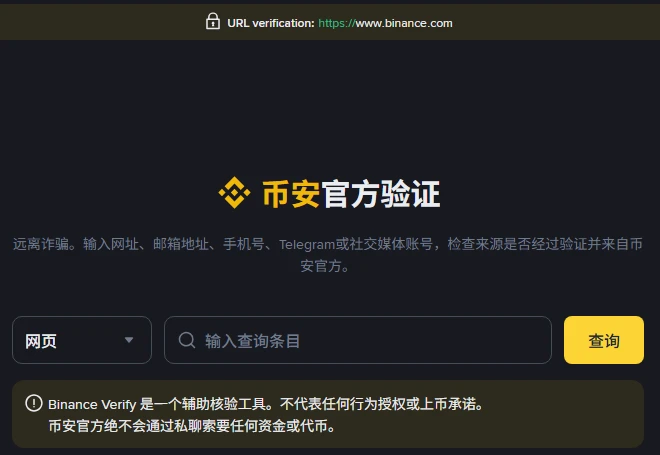
Pick a type on the left, paste what you want to check on the right, press the button. The page lists what you can look up: website addresses, email addresses, phone numbers, Telegram or social media accounts.
So the Telegram account that messaged you, the address that emailed you, the link you were told to click — all of them can go through it.
Two lines on that page matter more than the tool
The yellow box in the screenshot reads:
Binance Verify is a supplementary verification tool. It does not represent authorisation of any conduct or a listing commitment.
Binance staff will never ask for funds or tokens in private messages.
The second line is the foundation of the whole thing. If someone in a private chat asks you for money, for tokens, or to move funds to a "safe address", it is a scam — whether or not their account passes verification. There is nothing further to work out.
The first line is the tool's limit, and worth remembering too. A positive result only tells you the account is a channel Binance has registered. It does not mean anything that person says has been authorised. Someone can pair a genuine official link with an entirely invented story, and this tool will not catch that combination.
Whether the platform itself is sound is a separate question, taken apart in what proof of reserves does not prove.
And one thing that has been in front of you the whole time
Look at the dark strip along the top of the screenshot:
URL verification: https://www.binance.com
Binance pins the correct domain to the top of the page. The point of that design is so you can compare at any moment: is that what the address bar actually says right now?
Phishing sites work the domain. One extra letter, a different suffix, an added hyphen. Scanning past it, you would not notice. Set it beside that strip and it falls apart.
The order to handle this in
First, do not reply. Time pressure is what these operations run on — account frozen imminently, respond within 30 minutes. The moment you stop to check, most of the script stops working.
Second, put their identity through the verification tool. Handle, email, link, whatever you have.
Third, ignore every route they gave you. Do not click their link, do not scan their code. Type binance.com yourself, or open the app already on your phone, and look for the notice they described. A real notice exists inside your own account. A notice that exists only in a private chat does not exist.
Fourth, if you already clicked or typed something, change your password now and check your API keys and withdrawal whitelist. Do not wait to see whether anything happens.
If 2FA and the withdrawal whitelist are not on yet, the last section of the sign-up checklist explains why they come before your first deposit.
Three rules that need no thinking
- Anyone asking for funds or tokens in a private message is running a scam. That is Binance's own wording on its own page, not our inference.
- Never reach an exchange through a link someone sent you. Type the domain or use the app. Always.
- Seed phrases, private keys, verification codes and 2FA recovery codes go to nobody. Including people who say they are staff. Including people on a phone call. No genuine process asks for them.
This site's sign-up page follows the same rule: its button points straight at the binance.com domain, and you can hover over it to read the address before clicking.
Screenshot and quoted wording from the Binance official verification page, checked 2026-09-09. Pages and tools change; what you see when you open it is what counts.
This is an independent content site, not Binance and not its support team, and it cannot help with account problems. Sign-up entries on this site are referral links and this site earns a commission from them.